Board Client portal · plugged into Desk · included in Suite Your client stops asking. They just look.
Board is Marvin's client portal: it gives your client a space under your brand, through a single link. They see the profiles you've presented and where each role stands, and give feedback in one click. Desk tells you the moment they react.
Maintenance managerLyon · sourcing under waySourcedPresentedInterviewSigned
Management controller 3 profiles
Marie Laurent
Management controller · 7 years' experience
CVSummary
ApproveDeclineComment
Interview Thursday, 10 am
A.
Anonymised profile
Industrial management control · Example Group
Anonymised CVSummary
ApproveDeclineComment
Interesting profile. What's the notice period?Sophie Martin, Helio Énergie
Thomas Dupont
Management controller · 4 years' experience
CVSummary
ApproveDeclineComment
Declined by Sophie Martin
Firm side · Desk 4 notifications
What the consultant receives, without a single email.
Sophie Martin approved Marie LaurentManagement controller · 10:14 am
New commentInteresting profile. What's the notice period? · 10:16 am
Sophie Martin declined Thomas DupontManagement controller · 10:17 am
You booked the interviewMarie Laurent · Thursday 10 am · Board updated · 10:31 am
Demo, fictional profiles.
Three opinions, one interview booked. Not a single “where are we at?”
The client reacted from their space. Every opinion landed in Desk, on the right process.
What your client sees
Not a PDF attachment. A space that follows your pipeline.
Shortlists
You decide what they see. Down to the first name.
Name, photo, CV, score: for each mission, you choose what gets shared. A profile can be anonymised, first name hidden and companies blurred, to protect the candidate or meet the rules of a tender.
The level of detail is set mission by mission
An anonymised version when you need one
Shared with the client
Full name
Photo
CV anonymised
Summary
Companies mentioned blurred
A.
Anonymised profile
Management control · Example Group
What the client sees with these settings.
A mission's sharing settings, and how the client sees them.Illustration
Progress
They don't call to find out. They look.
Interviews booked, stages passed, next steps: your client sees where each candidate stands. Board updates from Desk at every status change, without you lifting a finger.
Updated from Desk at every status change
All their jobs on one page, one click to open one
Orée ConseilHelio Énergie · Overview1All jobs3 open jobs
2Each pipeline as a kanban or a list, as the client prefers.
3Nothing to update by hand: Board reads Desk.
All the client’s jobs, then the pipeline of one of them, as a kanban or a list.Illustration
Client feedback
One-click feedback beats an email in three days.
For every profile you present, your client says “like”, “dislike” or leaves a comment from Board. Their feedback lands on the candidate’s record in Desk, and you’re notified. The candidate no longer waits for someone to reopen their inbox.
Like, dislike, a comment
On the record in Desk, and as a notification
Board · client side
Marie LaurentManagement controller · 7 yrs
Presentation noteSeven years in industrial management control, available within two months.
1LikeDislike
Sophie Martin“Available for an interview on Thursday?”
→
Desk · candidate record
2Client share feedback
1 like · 1 comment
Sophie Martin“Available for an interview on Thursday?”
Management controller · Helio Énergie
3Sophie Martin reacted to the profileNotification · 10:14
1The client reacts in Board, with no account.
2The feedback lands on the record, in the candidate’s timeline.
3You get notified in Desk.
Feedback given in Board, and what it becomes in Desk.Illustration
Access
No account, no password. Just a link.
Your client has nothing to create and nothing to install. They click the secure link you send and land in their space, under your firm's name and logo. They see your brand, not Marvin's.
Secure link, opened straight from their inbox
Your firm's name and logo
From: Camille Rousseau, Orée ConseilSubject: Your candidates for the management controller role
Hi Sophie, three profiles are waiting for you. You can review them and give me your feedback directly online.Open my tracking spaceNo account to create.
The link arrives by email. One click and the client is in their space.Illustration
What Board removes
Every follow-up costs twice. You, and the candidate who's waiting.
Without Board
With Board
Profiles go out by email, as PDFs
→
Profiles are onlineCV and summary, in the client's space
You chase them for feedback
→
They approve, decline or commentAnd Desk notifies you
One follow-up call per role
→
Progress reads liveUpdated at every status change
The CV, resent again
→
Everything stays in their spaceShared profiles and documents, through the same link
“Complete visibility on our candidate and client database.”
Marvin B.Recruitment Manager · 421
400+ recruitment firms, IT consultancies and staffing agencies, including:
2018One mission ever since: recruitment
12people in Paris, and you can reach them directly
1 monthto bring over your history, with no downtime
99.5%target availability, data hosted in France
What feeds Board
Board shows what Desk knows. Nothing is retyped for the client.
The pipeline, the profiles and their summaries live in the same database. Board is the client's window onto it.
The candidate is hired: the invoice is drafted for you.
Included from Pro
12
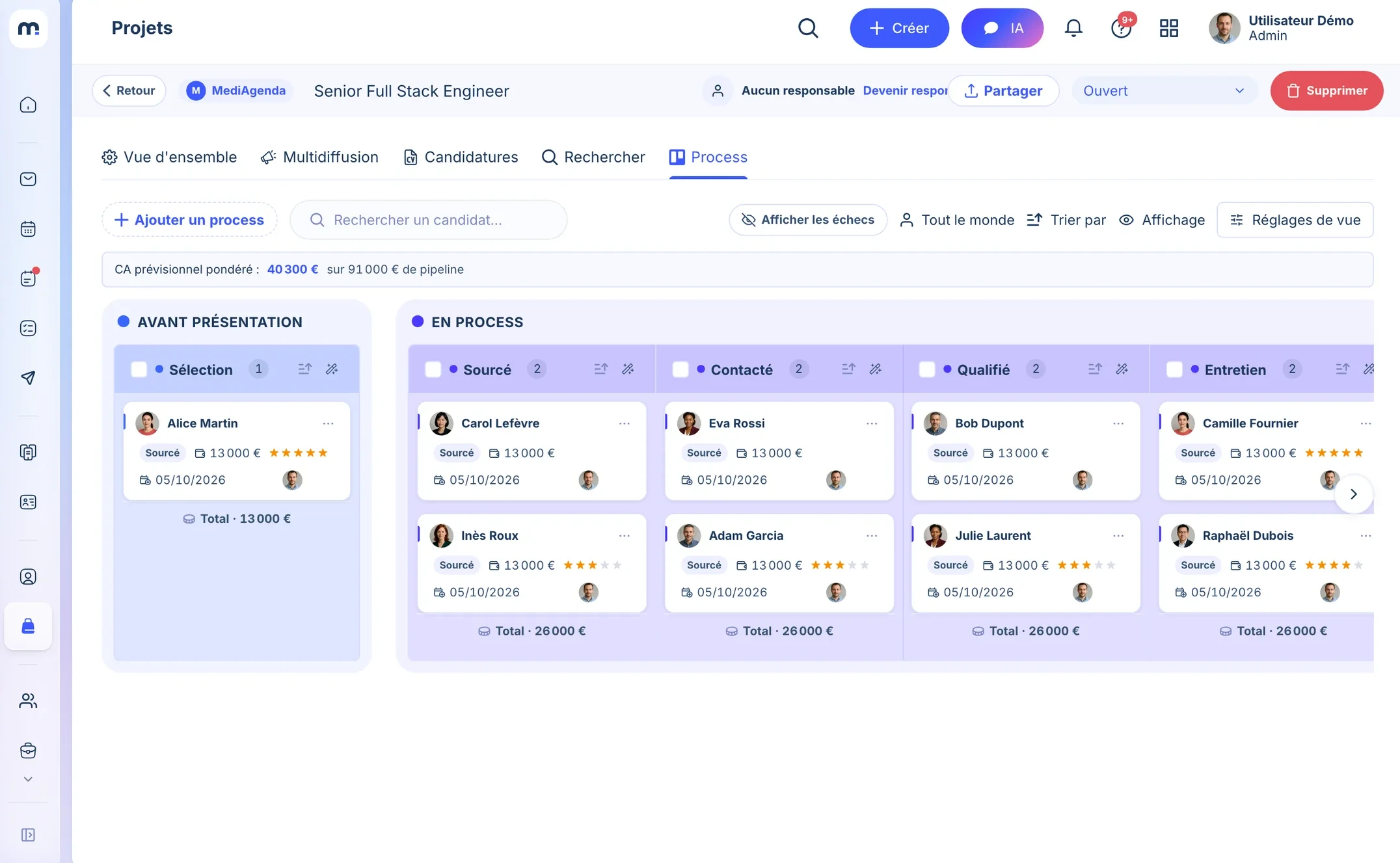
1The link starts from the job.Share, then “External portal”: you pick the visible columns and fields, and copy the link.
2The client sees this pipeline.The columns you picked, up to date at every status change.
Real Desk screenshot, demo data.
What people ask us about Board.
With Board, does my client need to create a Marvin account?
No. They reach their space through a secure link you send them. No account to create, no password to remember, no app to install.
Can profiles shared in Board be anonymised?
Yes. You choose what's shown for each mission: name, photo, CV, companies, score, or an anonymised version. You can hide the first name and blur the companies mentioned. It's set mission by mission, from Desk.
What exactly does the client see in Board?
Only what you share: the profiles presented, with CV and summary, where each candidate stands in the process, and the comment thread.
Can the client give feedback on profiles from Board?
Yes. For every profile presented, they approve, decline or leave a comment from Board. Desk notifies you the moment they react.
Is the Board space branded with my firm's name and logo?
Yes. Board shows your firm's name and logo: your client sees your brand, not Marvin's.
Is Board included in a Marvin plan?
Board is included in the Suite plan. You create as many spaces as you have active client missions.
Your client follows along. You recruit.30 minutes to show you Board and set up your first client space. No commitment.
 Marie LaurentManagement controller · 7 yrs

 Paul BergerFinancial analyst · 4 yrs
 Julie MoreauManagement controller · 7 yrs