

Book a demoDemo

Desk CV database software, ATS + CRM · the Marvin platform · included from Pro One record per candidate.
Not one tab per channel.

Desk is Marvin's ATS + CRM: it brings your candidates, your clients and your conversations together. Pipeline, CRM, LinkedIn, email and WhatsApp sequences, a single inbox, assignments and invoicing. Included from the Pro plan, with the AI Copilot. You stop juggling between tools.

  • 3 outreach channels
  • 3 pipeline views
  • 3 search modes
  • 1 inbox
Desk · Projects · Registered nurse ·Léa GarnierStep 6 of 6
Sourced
Contacted
Qualified
Interview
Submitted
Hired

Léa Garnier

Registered nurse · Lyon

Email
lea.garnier@example.comEnriched
Phone
+33 6 12 34 56 78Enriched
Source
LinkedIn, imported in one click
Sequence
Nurses Lyon · step 1 of 3
Client
Linked to the CRM

Demo, fictional profiles.

Activity 7 events

  1. CashPlacement confirmedThe invoice is ready as a draft: fee, client details, bank details.D+12
  2. NoteInterview note pinned6 years in intensive care, looking for a day shift. Submitted to the client.3:10 pm
  3. WhatsAppInterview bookedConfirmed for 2 pm. See you then!12:15 pm
  4. LinkedInLéa repliesI’m not actively looking, but I’d be happy to hear more.11:40 am
  5. EmailOutreach email sentBy the “Nurses Lyon” sequence9:05 am
  6. EnrichmentEmail and phone foundIn one click, from the record9:02 am
  7. LinkedInProfile imported into the talent poolSkills included9:00 am

Three channels, one process, one invoice. One single record.

Every message lands on the candidate’s record, whatever the channel. Nobody copies anything over.

What Desk brings together

The candidate, the client and the conversation. On the same screen.

ATS + CRM

An ATS on one side, a CRM on the other: that’s typing everything twice.

Candidates, contacts, companies and assignments share the same database. An update on the candidate side shows on the client side, and the other way round. A client contact can become a candidate without losing their history.

  • Contact details, notes and messages on one record
  • Email and phone found in one click
  • LinkedIn profile imported in one click, skills included
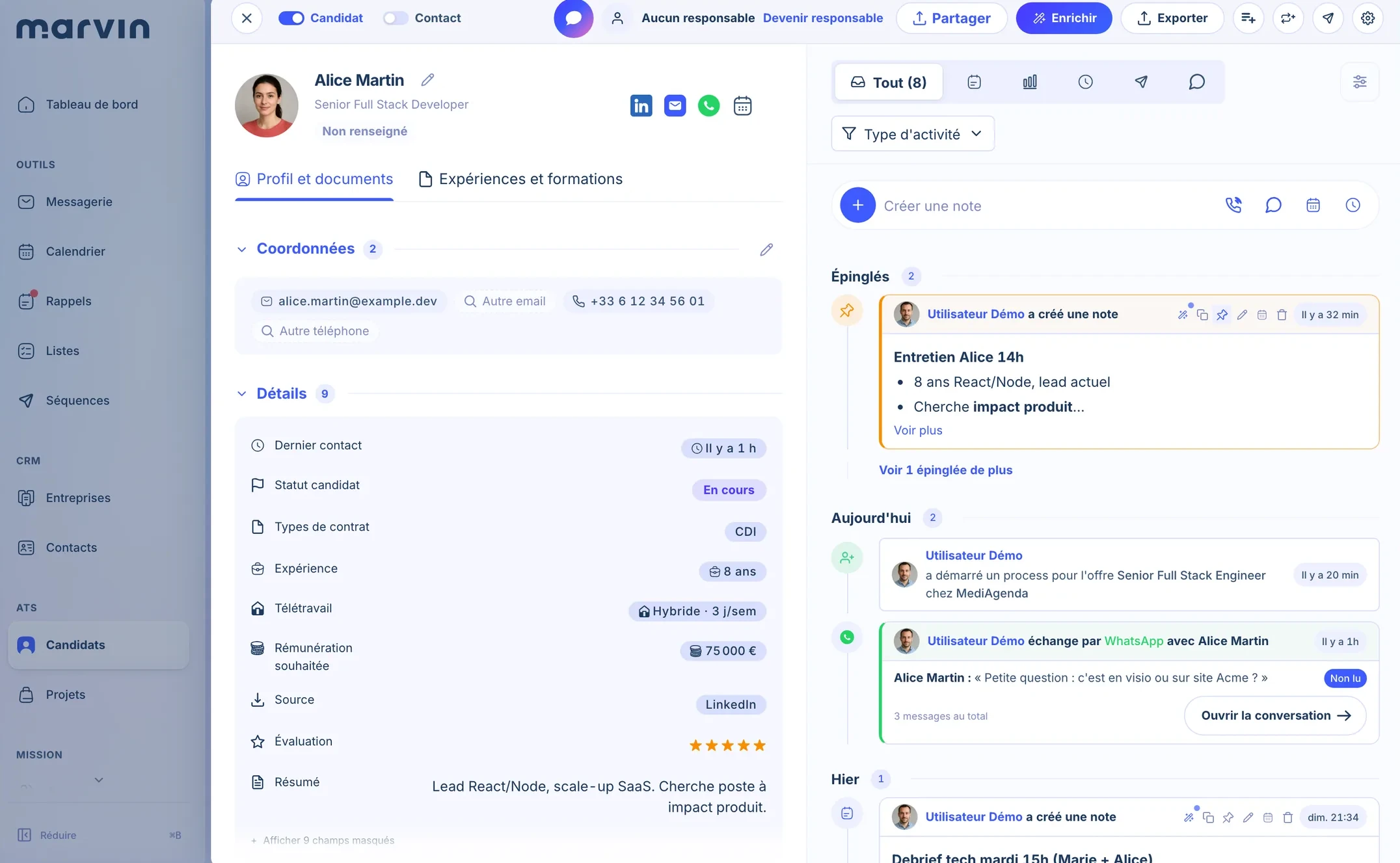
Candidate record in Marvin Desk, with its details and the feed of notes and messages
The candidate record: profile on the left, notes and messages on the right.Product screenshot

Search

A talent pool you can’t search is a graveyard.

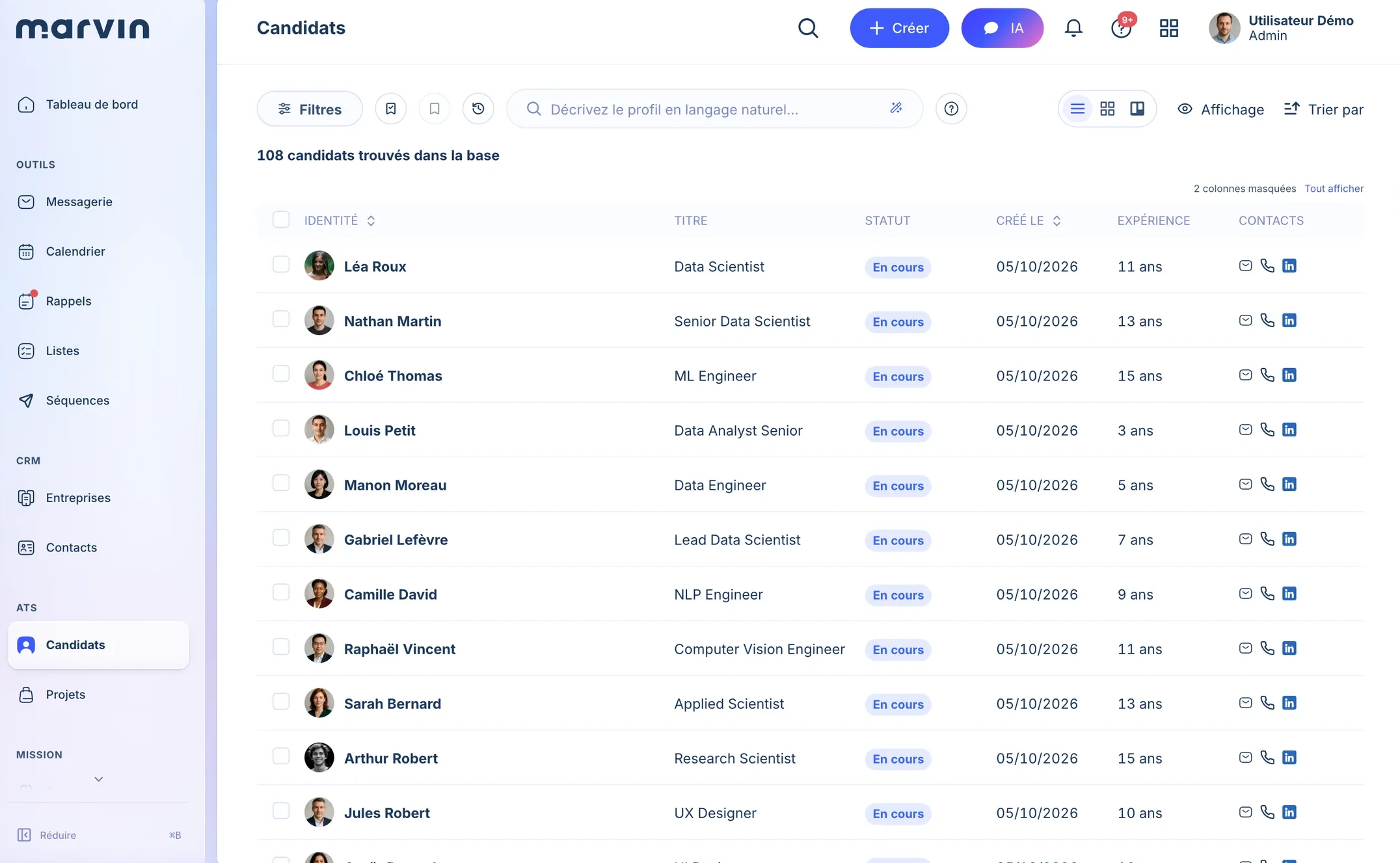
Keyword, Boolean or plain language. Type “senior accountant available in Lyon”: Desk searches CVs, your notes and imported LinkedIn profiles, not just the fields on the record.

  • Three search modes, everyone picks theirs
  • CVs and interview notes are searchable
Candidate list in Marvin Desk, with title, status, experience and contact details
Your whole database in one place, searchable by describing the profile.Product screenshot

Pipeline

Everyone sees the process the way they work. The process stays the same.

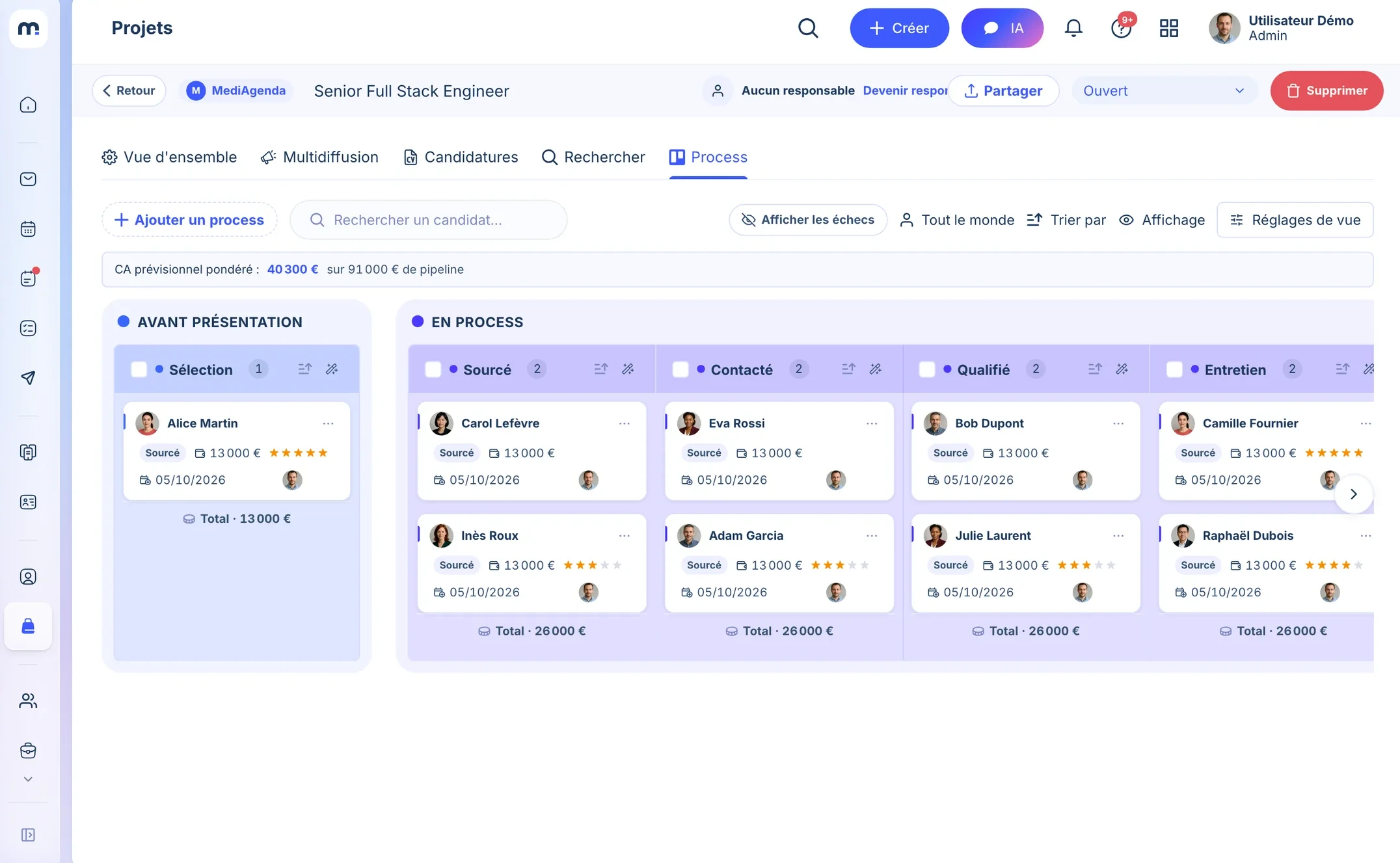
Grid, cards or kanban, with your own statuses. The whole team follows every job, from shortlist to interview, without forcing one format on everybody.

  • Three views, your statuses
  • Everyone picks their own view, without imposing it on the team
Kanban of a job’s candidates in Marvin Desk, from shortlist to interview
Every job tracked in kanban, for the whole team.Product screenshot

AI Copilot

The Copilot suggests. You hit send.

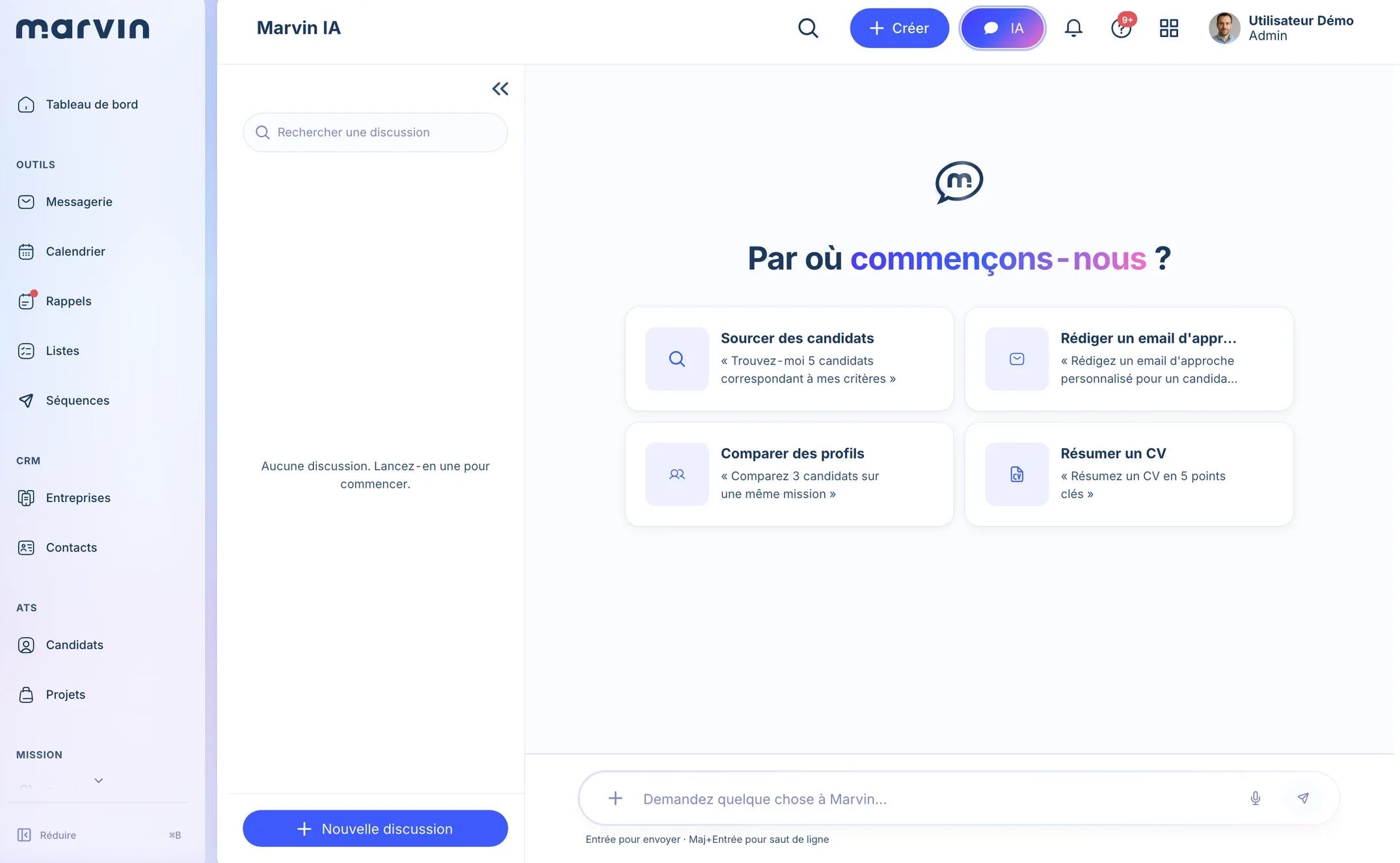
It searches, compares, summarises a CV and drafts a message from your own database. It doesn’t act alone: you read it and you approve it. And the MCP server plugs your database into Claude, ChatGPT or Cursor.

  • Included in every plan, no extra charge
  • MCP server: 53 tools on your database
Home screen of the Marvin AI Copilot, with suggested requests
Source, draft, compare, summarise: on your data.Product screenshot

Outreach and messaging, included

Follow up on three channels. Reply from just one.

One sequence, three channels, no forgotten follow-up.

Drag-and-drop editor, no code: conditions, delays and branches. Sending quotas are calibrated on your LinkedIn account to avoid restrictions.

One thread per candidate. Not three inboxes to watch.

LinkedIn, email and WhatsApp in a single conversation, continuously synced with Gmail and Outlook. The Copilot suggests a reply based on the history.

Léa GarnierOne thread, three channels
Email · sent by the sequenceHi Léa, a registered nurse role in Lyon might interest you.
LinkedInThanks! I’m not actively looking, but I’d be happy to hear more.
WhatsApp · unreadInterested, could we have a quick call tomorrow?
WhatsAppGreat, 2 pm?
WhatsAppConfirmed for 2 pm. See you then!
Read · 1 attachment: CV_Lea_Garnier.pdfAlso visible in Gmail or Outlook

Illustrative examples, fictional profiles. Delays and branches are up to you.

After the signature, Desk keeps going

The assignment, the timesheet, the invoice. In the same tool.

  1. The consultant fills in their timesheet. The client signs it online.

    Assignments and PeopleTimesheets sent from the consultant space, signed with a one-time code. No more back-and-forth by email.
  2. The margin works itself out. The spreadsheet can go.

    Margin per assignmentClient day rate, consultant cost, duration: gross margin is recalculated on every change.
  3. An assignment ending shows up before the bench, not after.

    60 days aheadthe consultant moves up in the availability score.
  4. Placement confirmed, invoice ready to review.

    Billing with CashA draft with the fee, the client’s details and your bank details. Payment schedule, credit notes, CSV accounting export.

Demo, fictional data.

What Desk replaces

Every tool you drop is one less thing to type.

Before
In Desk
Standard ATS or CRM
Candidates, clients and processOne database, three pipeline views
Third-party outreach tool
LinkedIn, email, WhatsApp sequencesQuotas calibrated on your account
Three inboxes
One unified inboxSynced with Gmail and Outlook
Third-party enrichment tool
Email and phone in one click250 credits per user per month on Pro
Timesheet and margin spreadsheet
Assignments, signed timesheets, marginWith the People consultant space
Separate invoicing software
Cash, wired to the placementCompliant invoices, CSV accounting export
General-purpose AI agent
Copilot and MCP serverIncluded, on your own database
Each number points to a line of the list: the tool replaced, and where it lives in Desk. Real interface labels, fictional profile.

With the apps that plug into it, Marvin replaces 7 tools with one. And your history is migrated in about a month, without bringing your agency to a halt.

How the migration works
“A complete, clear tool, used daily by the entire team.”
Anaelle B.Consultant · AMrecrut

400+ recruitment agencies, IT services firms and staffing companies, including:

2018One mission since: recruitment
12people, in Paris, easy to reach
1 monthto migrate your history, with no downtime
99.5%target availability, data hosted in France

What plugs into Desk

Desk is the core.
5 apps plug into it.

They all read from and write to the same database. You move from one to the next without losing context.

What they write lands on the record.

Candidate record in Marvin Desk: contact details, pinned notes, process and a WhatsApp exchange in the same feed
  1. Enriched contact detailsEmail and phone found in one click with “Enrich”, filed on the record.
  2. Pinned notesInterview notes, Note summaries included, stay on the record. The most useful ones are pinned at the top.
  3. ProcessA process started on a job shows up in the feed: who started it, and when.
  4. Multichannel exchangesLinkedIn, email and WhatsApp land in the same feed, unread flag included.
Product screenshot, demo account.

What people ask us about Desk.

How is Desk different from a standard ATS?

A standard ATS handles candidates and leaves you with a separate CRM and outreach tools on the side. Desk includes the client CRM, LinkedIn, email and WhatsApp sequences, and search across your CVs, your notes and imported LinkedIn profiles. In one interface, with no extra subscription.

Does Desk replace my LinkedIn outreach tool?

Yes. Sequences cover LinkedIn, email and WhatsApp, with conditions and delays. Quotas are calibrated on your LinkedIn account to avoid restrictions, and you run everything from your pipeline.

What comes with Desk?

ATS and CRM, sequences, messaging, assignments and the People consultant space, billing with Cash, and the AI Copilot. Career is included from Pro; Scout, Note, Board and Radar (in beta) are in Suite.

Does Marvin connect to LinkedIn and my email inbox?

Yes. You connect your LinkedIn account, your Gmail or Outlook / Microsoft 365 inbox, and your WhatsApp. Desk sends your LinkedIn (messages and invitations), email and WhatsApp sequences from those accounts, and conversations land in a single inbox, linked to the candidate or contact record.

Does Desk's AI Copilot write for me?

It assists: it summarises a profile, suggests a draft or a recommendation. You approve before anything is sent. It never acts on its own.

What is CV database software?

CV database software gathers CVs and candidate profiles in a base you can search, instead of leaving them in folders and inboxes. In Desk, every candidate has a record and search works by keywords, in boolean or in natural language: it covers the text of CVs, of your notes and of imported LinkedIn profiles, not just the fields of the record. Desk is included from the Pro plan.

Desk, on your real candidates.
In 30 minutes.We load a sample of your data and show you Desk at work.

Book a demo

Updated