AI Copilot · included in Pro and Suite · on your data
The Copilot does the work. You keep the final say.
The Copilot is the AI assistant built into Marvin, not a chatbot bolted onto the front. Included in Pro and Suite, it searches your database, compares profiles, drafts your messages and updates your records. By default, anything that goes out waits for your go-ahead, and Marvin does not use your data to train AI models.
You, 9:32 AMFind me three site managers available for the Construction site manager role at Orvane Consulting, compare them and draft a message for the best fit.
Searching your talent pool.match_candidates_to_job
Comparing the profiles to the role.score_candidates_for_job
Drafting the outreach.draft_outreach_for_person
Adding Marie to the process.update
Waiting for your go-ahead to send.
Pool · Construction site manager searching…
Marie LaurentSite manager · structural work · 8 yrs
92
Anaïs BenkacemConstruction site manager · finishing work · 9 yrs
84
Karim OualiSite manager · all trades · 7 yrs
77
LinkedIn draft to Marie Laurent
Record · Marie Laurent
Process
None
Stage
–
Nothing has gone out. The message is waiting for your approval.
Desk ·Marvin AIDone · approved by you
You, 9:32 AMFind me three site managers available for the Construction site manager role at Orvane Consulting, compare them and draft a message for the best fit.
Searching your talent pool.match_candidates_to_job3 available profiles, all already in your database.
Comparing the profiles to the role.score_candidates_for_jobMarie Laurent stands out: structural work, 8 years, two projects delivered ahead of schedule.
Drafting the outreach.draft_outreach_for_personDraft ready, in your tone.
Adding Marie to the process.updateRecord and pipeline updated.
Waiting for your go-ahead to send.Go-ahead received. Message sent from your account.
Pool · Construction site manager 3 available profiles
Marie LaurentBest fitSite manager · structural work · 8 yrs
92
Anaïs BenkacemConstruction site manager · finishing work · 9 yrs
84
Karim OualiSite manager · all trades · 7 yrs
77
LinkedIn draft to Marie Laurent
Hi Marie, your experience on structural work projects is exactly what Orvane Consulting needs to lead its property programme. Permanent Construction site manager role, team of six, starting in January. Would you be open to a 20-minute chat this week?
Record · Marie Laurent
Process
Construction site manager · Orvane ConsultingUpdated
Stage
Shortlist
Approved by you. Sent on LinkedIn at 9:41 AM.
Demo, fictional profiles and company.
The tool names shown are the ones the Copilot actually calls.
A morning with the Copilot
Three requests before noon. One chat.
A brief, a message, an interview prep. The Copilot draws on your notes, your history and your CVs, not on a model that has never met your candidates.
“Find five senior backend devs available in Paris.”
Five profiles from your pool, ranked on the role and on their history with you. match_candidates_to_job
“Write a LinkedIn message to Marie Laurent.”
A personalised draft in the tone you picked. You read it before anything goes out. draft_outreach_for_person
“Prep my 11 o'clock with Marie.”
A summary built from her notes, her timeline and her CV. generate_brief_from_process
Marie LaurentSite manager · meeting at 11:00
Why meet her
8 years in site management, two programmes delivered. Structural work and multi-trade coordination: the heart of the brief.
Strengths
Multi-lot project management, has led teams of 5 to 8, plan reading and budget tracking.
Watch-outs
Wants a structural-work-only scope. Turned down an offer in 2024: find out why.
Questions to ask
Why leave her current job? Her ideal type of project for the next 18 months? What makes her say yes or no?
Written from her notes, her timeline and her CV. Fictional profile.
Where it works
The same Copilot, in three apps.
It doesn't switch screens with you: it's already there. Scout and Note are part of the Suite plan.
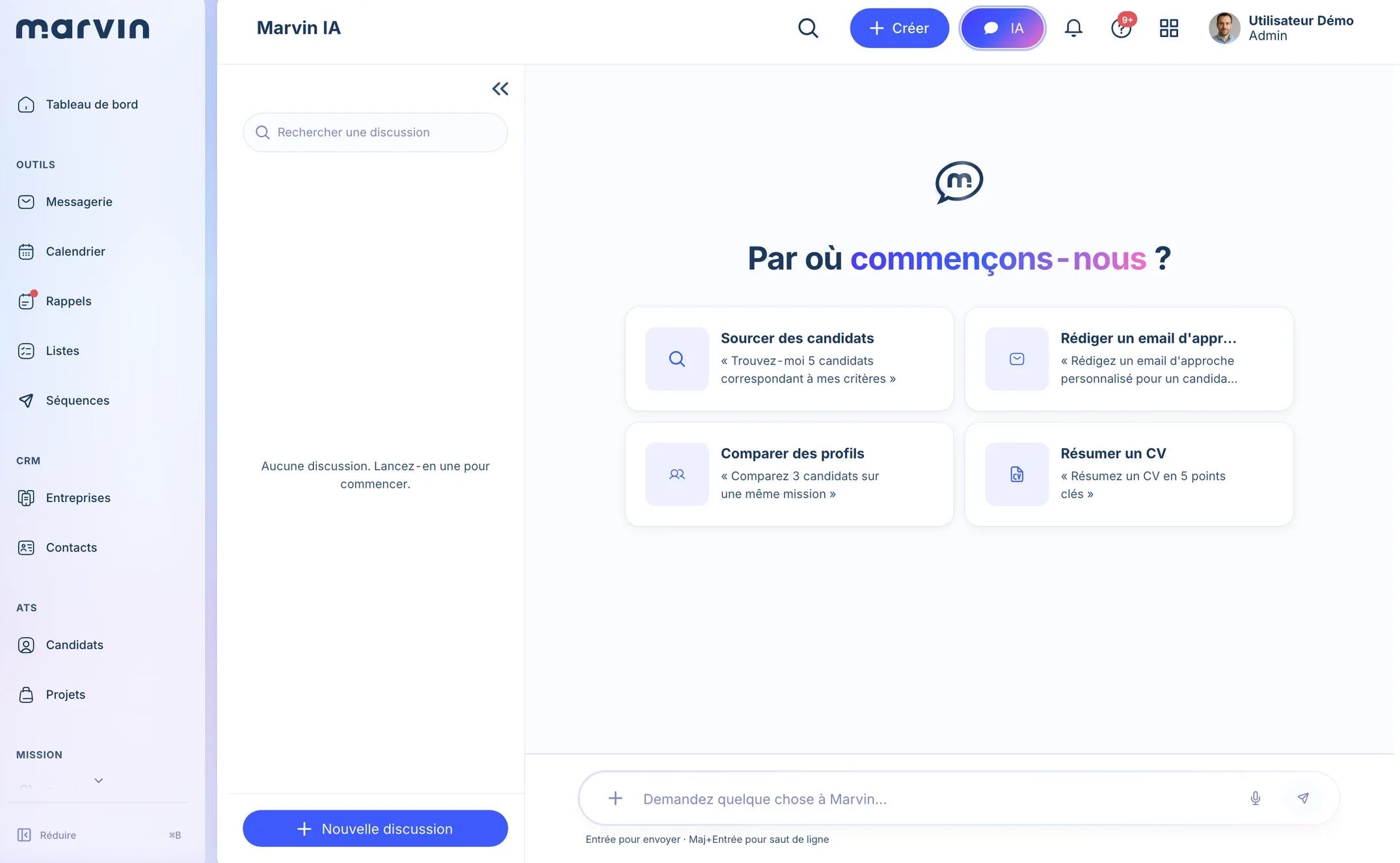
1The AI buttonIn Desk's top bar: the Copilot opens without leaving your screen.
2Starting pointsSource, draft an approach, compare profiles, summarise a CV.
3Your requestOne sentence, as you'd ask a colleague. It searches your database.
The Marvin AI screen in Desk. Product screenshot.
What it does alone, what it leaves to you
It prepares everything. By default, nothing goes out without you.
1
By default, sending a message waits for your approval.
Preview by defaultSending a message, adding someone to a sequence: you see the preview, you approve, then Marvin runs it.
2
It acts with your permissions, no more.
Your accountEvery action goes through your Marvin account and your permissions. It stays logged on the record.
3
Your candidates train no model.
Providers under contractAI processing runs through providers listed in our DPA, on plans that exclude training by default. You can also plug in your own key. Responsible AI
Marvin AIThe message is ready. Shall I send it from your account?
1Action to confirmSend a LinkedIn message to Marie Laurent
Action
Send a message · LinkedIn
2From
Your LinkedIn account, with your permissions
3Message
“Hi Marie, your experience on structural work projects is exactly what Orvane Consulting is looking for…”
Demo, fictional profile. Click: you decide.
And from the AI you already use
Marvin talks to your AI. Not the other way round.
Marvin is also an open MCP server. Connect Claude, ChatGPT, Cursor or any compatible client: 53 recruiting tools land in the chat you already open every morning.
1Step 1Connect your AI.
One click, one OAuth approval, no token to handle. The same address works for every client.
2Step 2Call the tools from the chat.
Every action goes through your account, with your permissions. Inside Marvin, the built-in Copilot takes over.
3Step 3Approve sensitive actions.
Sending a message, adding to a sequence: a preview by default before anything runs.
Your AI1Marvin connector · connected
Which profiles in my pool fit the Construction site manager role at Orvane?
2Marvin · match_candidates_to_job
Three available profiles, all already in your database:
Marie LaurentSite manager · structural work
Anaïs BenkacemConstruction site manager · finishing work
Karim OualiSite manager · all trades
Message Marie on LinkedIn.
3Marvin · send_message
Preview to approve
“Hi Marie, your experience on structural work projects…”
Nothing has gone out: the send waits for your approval.
Marvin, from the chat you already open.Illustration, fictional profiles
Via MCP, the AI runs on your subscription. Marvin doesn't bill these requests. The built-in Copilot is included in your plan, with monthly credits included whose usage you track in your settings.
The manager's feedback lands on the record, not in an email.
HR keeps the big picture without chasing anyone.
Frequently asked questions
What people ask us about the AI.
Does Marvin use my data to train an AI model?
No. Marvin does not use your data to train AI models. The AI processing Marvin runs (CV reading, Copilot) goes through providers under contract, listed in our DPA, on API plans that exclude training by default. You can also plug in your own key. And through MCP, the AI runs in your own client.
Which AI does Marvin use?
AI providers under contract, listed in Marvin's DPA, on API plans that exclude training by default. OpenAI is used to read CVs and to produce summaries and analysis. You can also plug in your own key (OpenAI, Anthropic, Mistral or Google) or, through the MCP server, work from your own assistant: Claude, ChatGPT or Cursor.
Does Marvin's Copilot send messages without approval?
Not by default. Sensitive actions (sending a message, adding to a sequence) go through a preview first: you approve, then Marvin runs it.
Do I need a Claude or ChatGPT subscription to use Marvin's AI?
No. The Copilot is built into Marvin and included in every plan. The MCP server plugs into the AI of your choice, if you use one: Claude, ChatGPT or any compatible client.
The Copilot on your data. In 30 minutes.We load a sample of your data and hand it today's requests.